Showing posts with label Direct Instruction. Show all posts

Monday, March 10, 2014

GetKahoot! Engaging & Effective Interactive Classroom Tool

We have Chromebooks, iPads, and student personal devices in EVERY classroom of our district.  We want technology to be used for educational purposes!  We want technology to make our job of educating our students more effective.

GetKahoot!  accomplishes all of this!

Students don't need a username and password.
Students can use ANY device.
Students are required to "know their stuff."
Students love gaming aspects!
Students love multiple choice!
Students love winning!

Teachers enjoy engaged students!
Teachers enjoy enthusiasm in the classroom!
Teachers enjoy implementing their content!
Teachers will love the preview screens!
Teachers could include one a week.

New Features To Kahoot: Rich Text Editor, Kick Inappropriate Names Out
View Overview Video


GetKahoot!  Preview Mode
This was a huge selling point for me!  Through GetKahoot!'s website, I am able to experience dual roles as the student and the teacher.  This allows me (and teachers) to view just how it will look when the Kahoot! is running in the classroom
View It


)

Our Final Scores!
A Lunch

 B Lunch

 C Lunch

Congratulations to COBRA (Joel J.) for 
being the Lunch N' Learn Overall Champion!


Our high school math department implemented GetKahoot!  after a homework assignment discussion and before a quiz.  

Monday, February 24, 2014

Thursday, March 8, 2012

Flashcards App - No Account Required

The App:  Flashcardlet

I have finally found an app that has two great options:
  • The ability to connect to Quizlet if we wanted to
  • The ability to CREATE flashcards for studying without an account
I liked that I presented students with information and instead of taking notes in a notebook or in a note app, students created study cards as they went along.


Students practiced the information!  Tons of features to the apps!


Completed the day, by using a formal assessment with a Google form.


Tuesday, February 21, 2012

Students Finally Can Get A Cell Phone

As I try to challenge students more in developing mathematical thinking.  Basically trying to follow some advice from Dan Meyer!  I went about a problem that was presented in our textbook, which of course, laid out the entire problem for them, in a slightly different way.

My plan presented them with this blog post and nothing more!


Students really struggled with the question of what to do.  Some even displayed their frustration through loud speaking!
  • I don't get this!
  • What are we suppose to do!
  • Where's the math in this!


Eventually, a student realized they need to research plans to see what the most cost efficient plan would be based on minutes.


After the initial fury of questions and debates, I presented the students with another Dan Meyer tactic.  A very small piece of the problem.


Finally, students started to use resources that seemed to fit the task.  The Graphing Calc app was used by this student to compare different plans that were presented in the problem on our blog.  I really liked how this student explained the reason why he was using the app.


As a bonus, I was able to utilize my new podium placement with a student immediately placing their graph so all of the students could see.  I really like this podium placement as it is centrally located.  I also have another mirror connection cable so that students in the front of the class can quickly display their iPad screens.

Wednesday, February 8, 2012

How Ant Smasher App Fit Into Elimination Method

One More Time:  Integrating a tech tool at the appropriate time is THE single most important concept teachers need to understand when using tech tools in their classroom.

Today was a prime example.

I introduced the Elimination Method in a Direct Instruction setting.  After showing one problem, I asked the students to find the Ant Smasher App (FREE) on their iPad.  I did not instruct them in any way, but told them to play.

Screams, Shrills, Excitement (especially when bugs multiplied) Commenced!


After 3-4 minutes of smashing ants, I asked this...


The students then proceeded to their groups to work on similar problems.


As always, I find a concept and attach any app, website, video, or anything else that connects life moments to mathematical content.


Tuesday, January 17, 2012

Lecturing In An Unique Way

At times we do need to give the students information!  We decided that we were going to have 2 days of student investigation using QR codes and search tools on the iPad.

After that we are solidifying their learning by "telling the story" so that they can understand the Rise to Revolution!

See how we did it!


Love the fact that students are starting to grab the app they feel is best for the job!


Student demonstrates split keyboard while taking notes in Google Docs

Monday, January 16, 2012

Direct Instruction To Group Work

This activity didn't really require much from the iPad, but the whole "rethinking the learning environment" has come about because of iPads.

Today, we needed to get some direct facts to the student, but certainly didn't want to have an entire class period of "sit and get".  So we came up with the below activity.


Saturday, December 17, 2011

Digital Citizenship

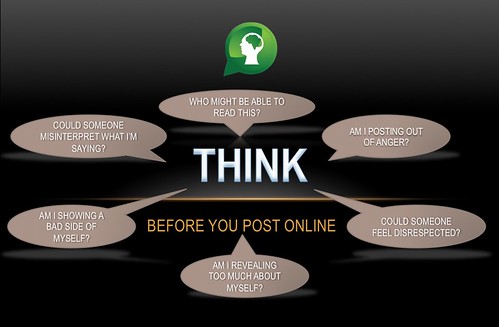
Think Before You Post
Picture Source 
Due to our iPad implementation this year, we have made it imperative that we teach students proper etiquette while online.

We are in the process of creating a final digital citizenship creation and this was our cooperating teachers one day direct instruction presentation.

All credit for this creation goes to my team teacher.  He made the entire presentation!
Get The Presentation!


More videos to come on our student's creations!

Friday, November 18, 2011

Animation HD

We have always looked for apps that can help students create.  This one may be one of the best.

We have worked on students understanding the creation of equivalent fractions using the "Giant One" method or the 1 as a fraction method.  Example:  4/4, 1/2, 6/6

To have students understand the process we gave them the Animation HD app.  See what transpired!

We'll try to post some finished videos as they become complete.


Student Productions:


Friday, November 4, 2011

Persuasive Writing - Lesson & YouTube Resources

As we complete our afternoon block combination class with social studies and communication arts, we created a persuasive writing lesson complete with the ways that people use propaganda.

Our class in direct instruction...


The entire play list of videos we used with descriptions of the type of propaganda that they are...


To combine this with social studies, students will need to persuade someone to live in Raiderville.

Our Google Presentation is below...

Friday, October 14, 2011

Career Clusters in an Invention Process

We developed an invention and decided how each of the 16 career clusters were involved in the process.

In this video, students posted their ideas on Twitter.


Saturday, September 3, 2011

Students Create New Game - PBL Introduction

This was a great idea.  We have an "afternoon block' of one hour and twenty minutes to complete social studies and communication arts.  47 students learning at one time.  Our first attempt at the problem based learning aspect was to demonstrate a game that has never been created.  Since placing 47 students in one room would be challenging we created a Ustream Channel and broadcast the instruction to two different rooms.  It was quite successful.  In the future, we want to incorporate Google Chat so that students from the other room can communicate with the students that are being presented.


Students watching in another classroom.


We have 12 different learning areas in our two classrooms.  Students have access to a large whiteboard learning area.  This was fantastic for students to draw, write, and create their game.  The best aspect of the whiteboard area is that it does NOT need to be erased.  Students will return on Tuesday and their ideas will still be present.  AWESOME!

Related Posts Plugin for WordPress, Blogger...