As we progress through our Flex Mod homeroom, we have a Universal Learning topic every Thursday. This Thursday, we are presenting students with "3 Digital Artifacts Every Graduate Should Have Before Leaving High School". I incorporated an iRig Mic, iPad, and iPad stand to record the "guest speakers".
Appreciate George Couros for some direction.

Showing posts with label Digital Footprint. Show all posts
Showing posts with label Digital Footprint. Show all posts
Wednesday, January 20, 2016
Wednesday, December 23, 2015
About.Me Student Digital Life
As we move into a new way of thinking, we are encouraging students to positively portray themselves online. By "new way of thinking" I refer to a past practice where we encouraged students to limit items online. Today, we need to encourage students to have three major digital items before leaving high school. As George Courcos elaborated on these items in his 2015 TIES Conference Keynote, we must mold student's behavior and knowledge so that they are positively portrayed online.

Mr. Otto, business teacher, was already in the midst of having his students develop a resume. We decided that students would create an About.Me page so that they begin to have one of the three items they need to have before they leave high school.
Our students and instructor created some amazing pages on their way to a positive, digital life. I used the embed feature from About.Me to create the information below. If you are in the About.Me community, consider giving the students a compliment.

Mr. Otto, business teacher, was already in the midst of having his students develop a resume. We decided that students would create an About.Me page so that they begin to have one of the three items they need to have before they leave high school.
Our students and instructor created some amazing pages on their way to a positive, digital life. I used the embed feature from About.Me to create the information below. If you are in the About.Me community, consider giving the students a compliment.


Tuesday, February 11, 2014
Google Sign Out From Anywhere
Process:
Impact On Students:
Citizenship: Students and staff need to be diligent in protecting their digital reputation and representation on the web. Logging out is probably the one thing that students forget to do on a regular basis. Continue to encourage students and staff to be diligent in protecting their digital citizenship.
- Sign into Gmail from any computer
- Scroll down to the bottom of all your mail
- Click Details (small, on lower right)
- Sign Out All Other Sessions
Impact On Students:
Citizenship: Students and staff need to be diligent in protecting their digital reputation and representation on the web. Logging out is probably the one thing that students forget to do on a regular basis. Continue to encourage students and staff to be diligent in protecting their digital citizenship.
Monday, January 20, 2014
Parent Guide To Navigating Social Media
Our middle school counselors, Mrs. Gerth and Mrs. Wagner, asked me to create a presentation to help parents understand some of the social media tools their son/daughter may be using.
Impact On Students:
Citizenship: Students and parents need to be aware of the positive and negative affects of their actions using social media.
- Shared a riveting social media video
- Provided ten social media tools and some information about them
- Provided five "Action Items" they should incorporate immediately with their children
- Create accounts together
- Model Appropriate Posting Behavior
- Insist On Their Account Information
- Discuss Ideal Information Released
- Search Names, Search Friend's Names
- Shared Cell Phone Contract
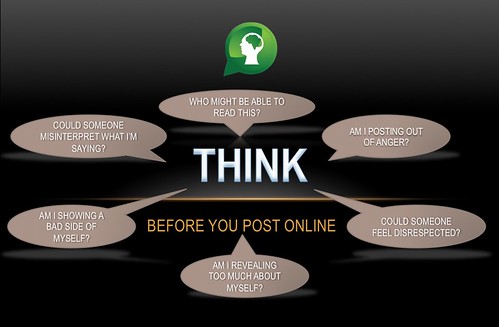
- Shared THINK Poster
- Provided Survival Kit that creates conversations about social media
Impact On Students:
Citizenship: Students and parents need to be aware of the positive and negative affects of their actions using social media.
Friday, January 13, 2012
iPad Camera & YouTube Channel
So many articles have focused on teachers branding themselves in a positive light. We speak on a daily basis to students about branding themselves in a professional manner on the web. A FREE and easy method of positively branding your classroom and all that happens on a daily basis is a YouTube Channel.
For me, it started with the idea that I would document everything that happens in my journey with iPads in my classroom. While I like typing and certainly appreciate my 11th grade teacher teaching me the home row in typing class, I can't type fast enough to document everything.
My solution! Use the iPad2 camera and a YouTube account. (Signing in is so easy if you are a GAFE school or have a personal Gmail account) Having this option has allowed me to post less than three minute videos in such a short time. The great thing for me is that it is quick. See how I exactly do it:
Problem: I don't have an iPad! If this is you, consider using your Smartphone. Android services (yes, I said the competitor on this blog) on a Smartphone make it quite easy to upload a video to YouTube. See how this can be done.
Once you have decided to take the plunge, set up your YouTube channel. I don't have time to create all of these, so I used a pretty decent series by the manager of the link above.
My Settings:
- I have connected with our classroom blog and Twitter account
- I have included Playlists that are educationally based and used in our classroom
- I have created a featured video section on the front page-this rocks
- I NEVER state a students name while filming them
- I try to keep the video less than three minutes
- Lately, I have started to include students describing steps in tech teaching-it is amazing how much more students listen to themselves and classmates when learning something new.
One Final Obstacle: My school & district block YouTube!!! If you have the desire, take my channel and show administrators, school board members, and anyone else that wants to listen and show how it can positively reflect on your school district. I know that tech support can choose to allow certain YouTube sites to be unblocked. Have them make your YouTube channel the one! If that doesn't work, take the video and upload it at home.
There truly is no reason, that you can't create a YouTube channel with a small goal of posting 1 video a week. I get the fact that I may be overboard by posting 428 videos in less five months, but so many community members, administrators, teachers, students, and parents appreciate seeing the many positive educational experiences occurring daily in our classroom.
I would certainly welcome any feedback on this concept and other examples of educational classrooms that are utilizing this FREE method of promotion!
Monday, January 9, 2012
Interactive White Board and iPad Apps
Having the iPads plus an interactive SMARTboard really engages students to the point that I believe students are not thinking about anything but our lesson.
See the process:
Finding that color and the ability to customize the writing motivates students to be creative.
All important reflection! Students complete the learning process by posting their creations from above to their blog! They do this by holding the home button and the top button of the iPad to create a screen shot. Students are able to access that picture through the Blogger app. This allows for summarizing of concepts and finalization.
See the process:
Finding that color and the ability to customize the writing motivates students to be creative.
All important reflection! Students complete the learning process by posting their creations from above to their blog! They do this by holding the home button and the top button of the iPad to create a screen shot. Students are able to access that picture through the Blogger app. This allows for summarizing of concepts and finalization.
Thursday, December 22, 2011
Teaching Digital Citizenship & the Process
So we wanted to continue to emphasize responsible digital citizenship and we wanted to create a lip dub! We accomplished both!
The entire process took four days. However, our resource teacher, Mr. V., spent numerous hours writing the scrip and stating the process. Also, a huge thank you goes out to the other members of our 8th grade team for providing additional students during taping!
Our Story Board
Some Direct Instruction
We walked through the scrip with a video shown to students.
All 47 students were given specific tasks to create props for the video. Students worked together for two days to create signs that are seen in the lip dub!
The entire process took four days. However, our resource teacher, Mr. V., spent numerous hours writing the scrip and stating the process. Also, a huge thank you goes out to the other members of our 8th grade team for providing additional students during taping!
Our Story Board
Some Direct Instruction
We walked through the scrip with a video shown to students.
All 47 students were given specific tasks to create props for the video. Students worked together for two days to create signs that are seen in the lip dub!
Wednesday, December 21, 2011
Our Class Work On Google
Student discovers that when searching for "Growth Triangle", a mathematical concept, that our classes' previous work from the beginning of the chapter posted online was found by Google.
See her reaction!
See her reaction!
Saturday, December 17, 2011
Digital Citizenship
 |
| Picture Source |
We are in the process of creating a final digital citizenship creation and this was our cooperating teachers one day direct instruction presentation.
All credit for this creation goes to my team teacher. He made the entire presentation!
Get The Presentation!
More videos to come on our student's creations!
Tuesday, November 22, 2011
Thursday, October 6, 2011
Students' Digital Professional Portfolio
Eventually students will have three public professional portfolio areas on the web and one private. Video explaining it below!
A letter that we used to inform the parents is below and also HERE.
A letter that we used to inform the parents is below and also HERE.
Wednesday, October 5, 2011
Blogger Comments on iPad2
I'm not going to lie, there have been several technically challenging moments with GAFE, specifically logging in and working with a Google Doc, and the iPad2.
THIS, HOWEVER, WASN'T ONE OF THOSE TIMES!
We created a writing prompt from this great resource as it pertained to personality traits. The specific post and comments that students viewed are here! (Maybe you have time to post a comment so that students see that it is the world wide web!)
One of our focuses stemmed from emphasizing to students that this will become another digital footprint in their life! With this in mind, students took all things pertaining to writing very seriously!
Students first logged into our GAFE page. We then went to our classroom blog, chose our Google Profile as our account information, typed the comment, and completed the spam word.
THERE WERE NO GLITCHES! More of this commenting to come by students as it was very easy!
THIS, HOWEVER, WASN'T ONE OF THOSE TIMES!
We created a writing prompt from this great resource as it pertained to personality traits. The specific post and comments that students viewed are here! (Maybe you have time to post a comment so that students see that it is the world wide web!)
One of our focuses stemmed from emphasizing to students that this will become another digital footprint in their life! With this in mind, students took all things pertaining to writing very seriously!
Students first logged into our GAFE page. We then went to our classroom blog, chose our Google Profile as our account information, typed the comment, and completed the spam word.
THERE WERE NO GLITCHES! More of this commenting to come by students as it was very easy!
Subscribe to:
Posts (Atom)
