So we wanted to continue to emphasize responsible digital citizenship and we wanted to create a lip dub! We accomplished both!
The entire process took four days. However, our resource teacher, Mr. V., spent numerous hours writing the scrip and stating the process. Also, a huge thank you goes out to the other members of our 8th grade team for providing additional students during taping!
Our Story Board
Some Direct Instruction
We walked through the scrip with a video shown to students.
All 47 students were given specific tasks to create props for the video. Students worked together for two days to create signs that are seen in the lip dub!

Thursday, December 22, 2011
Wednesday, December 21, 2011
Our Class Work On Google
Student discovers that when searching for "Growth Triangle", a mathematical concept, that our classes' previous work from the beginning of the chapter posted online was found by Google.
See her reaction!
See her reaction!


Pic Collage App For ReviewIng Math Concepts
A collage of all the students and their Chapter 4 Math review as a pic collage.

Apps like Pic Collage really engage students to the point that time flies! Price: Free
I have found that using apps that create items is a great way to review concepts. See how we used the app and the features of Pic Collage.

Apps like Pic Collage really engage students to the point that time flies! Price: Free
I have found that using apps that create items is a great way to review concepts. See how we used the app and the features of Pic Collage.
Tuesday, December 20, 2011
Creative App Carousel Day
Students have a problem:
How can they stress responsible digital citizenship to a specific audience in a creative way?
Today we allowed students to explore eight suggested creative apps for use in their upcoming presentation on responsible digital citizenship.
See The Specific Activity
A major reflection piece in this activity was to rate the apps that they were exploring. I used a Google form to acquire their opinion. See The Form!
View the day's activities below:
We also introduced them to six Web 2.0 tools.
How can they stress responsible digital citizenship to a specific audience in a creative way?
Today we allowed students to explore eight suggested creative apps for use in their upcoming presentation on responsible digital citizenship.
See The Specific Activity
A major reflection piece in this activity was to rate the apps that they were exploring. I used a Google form to acquire their opinion. See The Form!
View the day's activities below:
We also introduced them to six Web 2.0 tools.
Solving System of Equations
We formalized the concept through this classroom learning environment:
Groups chose any method to present their work and their answers.
Short video clips of the presentations:
Reflection: During the entire day and one half lesson, I was moving throughout the groups giving small group direct instruction and guidance. I really like this method of teaching. It allows for leaders to lead small groups and for constant discussion of the concept with students. I also like the end product where the students need to become the teachers. Had we had more time, all students should have been involved in the presentation. I also wish students would have used more creation apps. Next Time!
Groups chose any method to present their work and their answers.
Short video clips of the presentations:
Reflection: During the entire day and one half lesson, I was moving throughout the groups giving small group direct instruction and guidance. I really like this method of teaching. It allows for leaders to lead small groups and for constant discussion of the concept with students. I also like the end product where the students need to become the teachers. Had we had more time, all students should have been involved in the presentation. I also wish students would have used more creation apps. Next Time!
Monday, December 19, 2011
Administration Visit
When implementing technology so many people want to "see how it is done". I welcome that!
To date, over 300 teachers, community members, parents, and administrators have entered my room to see the activities. It is important to "not do anything special". What's meant by that! If an educator does something out of the ordinary then it is not using the tech as a tool. It is putting on a show!
We structure our lessons when people visit the room the same way we do when there is no one in the room but students and teachers. We intertwine the tech as a tool combined with many other tools!
See what we did by Viewing Our Activities While They Were Here
Some video of their visit! Anyone is welcome at anytime!
To date, over 300 teachers, community members, parents, and administrators have entered my room to see the activities. It is important to "not do anything special". What's meant by that! If an educator does something out of the ordinary then it is not using the tech as a tool. It is putting on a show!
We structure our lessons when people visit the room the same way we do when there is no one in the room but students and teachers. We intertwine the tech as a tool combined with many other tools!
See what we did by Viewing Our Activities While They Were Here
Some video of their visit! Anyone is welcome at anytime!
Saturday, December 17, 2011
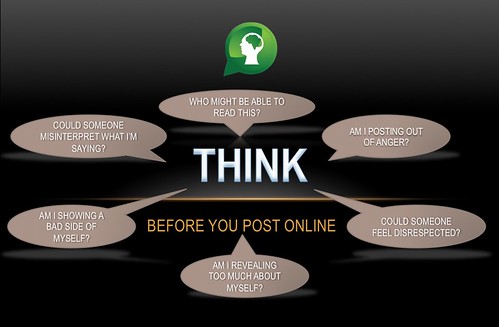
Digital Citizenship
 |
| Picture Source |
We are in the process of creating a final digital citizenship creation and this was our cooperating teachers one day direct instruction presentation.
All credit for this creation goes to my team teacher. He made the entire presentation!
Get The Presentation!
More videos to come on our student's creations!
Friday, December 16, 2011
TRULY Interactive Whiteboard Activity
Because of this presentation and @benjaminfriesen at TIES11, I created this...
I realize it is simple, but it isn't just a slide of writing, and it is a start!
Students are working on it here:
We then incorporated the Algebra Touch Intro App into the lesson for practice.
I realize it is simple, but it isn't just a slide of writing, and it is a start!
Students are working on it here:
We then incorporated the Algebra Touch Intro App into the lesson for practice.
Thursday, December 15, 2011
Student Video Production
As part of the 21st Century Model Classroom concept, our district is creating student produced videos highlighting the learning atmosphere. These videos will contain footage of events occurring in the classes and interviews of students and teachers.
Today was our day to be video taped. (Not sure why we use video taped, it is all digital media)
The students were great and really showcased what we do on a daily basis!
Today was our day to be video taped. (Not sure why we use video taped, it is all digital media)
The students were great and really showcased what we do on a daily basis!
High school students in our district are producing videos of 21st century model classrooms-today was our day 4 filming: ipaddiction.blogspot.com/2011/12/studen…
— RecessDuty (@RecessDuty) December 16, 2011
Setting The Stage With an iPad
Our problem is quite boring with black words on a white paper.
The iPad (and really any device) allows us to do some 20% time of learning. We investigated what the Iditarod is all about prior to us attacking this problem. There were no limitations. I just emphasized with the students that I knew nothing about this race. Students found maps, videos, past winners, distance, and many other items.
It definitely was my hook toward getting their attention.
Students were able to share their findings by having their iPad mirror to the large screen so that all students could view the information. Great discussion.
We continued with three additional problems, followed by the students creating their own intersection of two equations. We used Screenchomp to create.
The iPad (and really any device) allows us to do some 20% time of learning. We investigated what the Iditarod is all about prior to us attacking this problem. There were no limitations. I just emphasized with the students that I knew nothing about this race. Students found maps, videos, past winners, distance, and many other items.
It definitely was my hook toward getting their attention.
Students were able to share their findings by having their iPad mirror to the large screen so that all students could view the information. Great discussion.
We continued with three additional problems, followed by the students creating their own intersection of two equations. We used Screenchomp to create.
Subscribe to:
Posts (Atom)
